







A server and an external storage shelf rarely leave the factory in the same year. The quote still arrives as one line: external SAS, two meters. That line is missing the plug at each end, and it treats every external SAS page as if it printed the same length. If you are the engineer or buyer writing that line, work through the six decisions below in order, check the five mistakes that ship the wrong cable, and paste the checklist at the end into your request.
Lianbang's MiniSAS SFF-8088 cable is a passive external SAS cable in 28–30 AWG, for a connection outside the chassis. The listing does not name the equipment at either end, and it does not print a data rate or a length in meters.
SAS cable types on the outside of the rack
SAS cable types split into the drive end, the link inside the chassis, and the cable that leaves the rear panel. SAS connector types follow that split. Both external cables in Lianbang's catalog have a metal shell and a blue pull tab. The SFF-8088 photo is a straight cable with that shell at both ends and a black round jacket.
A SAS JBOD enclosure is the shelf full of drives that sits in the next rack unit, or in the next rack. The drives sit on a backplane inside the shelf. What is a SAS backplane, for this order: the board the drives plug into. The cable you buy stops at the port on the rear of the shelf. It does not run onto that board.
SAS expander vs HBA changes which card sits in the server. It does not change the cable. An expander and an HBA can each present an external port. Write the port, not the card name.
Decision 1: Confirm the link leaves the chassis.
Both cables in this guide are external. The SFF-8088 listing places the SAS connection outside the chassis. The HD listing describes a link between storage equipment, and its photo shows a metal shell with a blue pull tab at each end.
A header on a card inside the server, or a backplane connector you can reach only with the lid off, is a different cable. Say "rear panel" on the line, for the server end and for the shelf end. If one end is still inside the server and the cable exits through a bracket, write that down as its own case. The straight external photo does not show that bracket.
Decision 2: Write the connector at each end before you write a length.
Older shelves use external SFF-8088. The HD cable is SFF-8644. The two plugs do not mate. A line that says only "Mini SAS HD" or only "external Mini-SAS" can be read as either one.
Walk to the rear of the server and the rear of the shelf and write both numbers. Both catalog photos show the same shell at both ends. That is the straight catalog cable. A server with SFF-8644 and a shelf with SFF-8088 needs those two numbers on the line, and the build is confirmed on the order against a drawing.

Decision 3: Order the straight catalog cable only when both ends match.
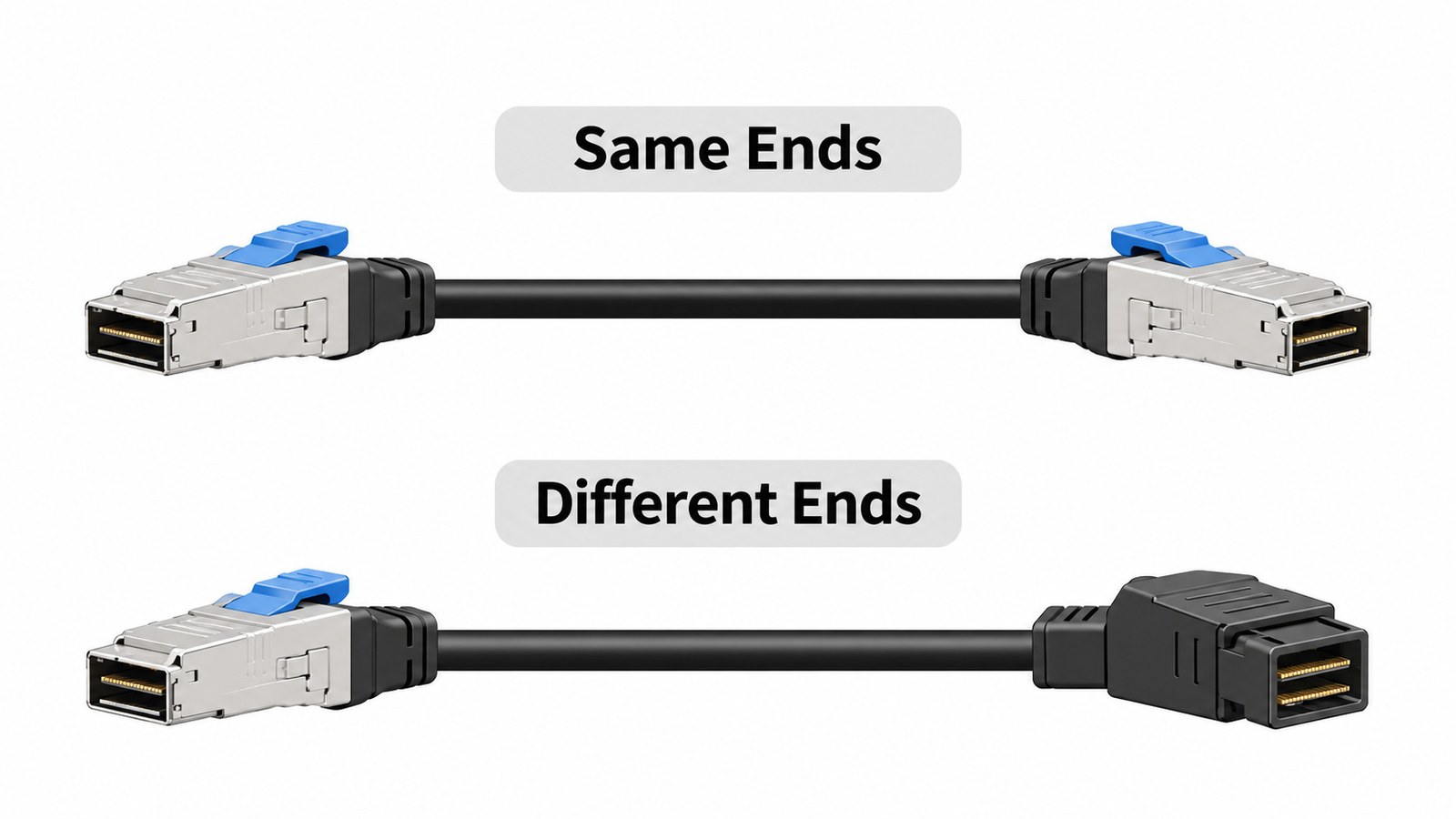
The SFF-8088 photo is a straight cable: metal shell and blue pull tab at each end, black round jacket. The HD photo is a metal shell and a blue pull tab at each end. Neither photo is a cable with a different plug at each end.
If both ports are SFF-8088, the straight SFF-8088 cable is the catalog match. If both ports are SFF-8644, the straight HD cable is the catalog match. If the ports differ, send the two part numbers you are replacing, or a drawing that shows which plug faces the server.
Decision 4: Apply the SAS cable length limit the catalog actually prints.
SAS cable length limit is not one number for every external SAS cable. SAS cable max length is printed for only one of these two cables.
The HD listing gives a passive reach of up to 7 m, at 12 Gbps, in 26–30 AWG. The SFF-8088 listing says the cable suits a longer passive run, in 28–30 AWG, and prints no length in meters. Copy 7 m onto an SFF-8088 line and you have borrowed the HD figure.
Measure the run from port to port. Include the drop down the rack and the slack for the connector, not only the gap between the two racks. If both ends are SFF-8644 and the measured run is within 7 m, the HD listing's passive reach covers it. Past 7 m, that listing no longer describes the cable, and the length is confirmed on the order. On an SFF-8088 run, the length is confirmed on the order even when the gap looks short, because no length is printed.

Decision 5: Take the gauge from the listing that matches the connector.
The SFF-8088 listing gives 28–30 AWG. The HD listing gives 26–30 AWG. The ranges overlap, and they are not the same range. Write the gauge next to the connector it belongs to.
A thinner wire in the published range bends more easily. A thicker wire is the one you look at when the run is long. The listing gives the range. The gauge inside that range is confirmed on the order.
Decision 6: Copy the rate only from the listing that prints one.
The HD listing gives 12 Gbps and an SFF-8636 management interface. It also compares the copper cable with a short optical link and lists lower cost and lower power. Those statements stay on the HD line. They describe the passive cable inside its printed reach.
The SFF-8088 listing publishes no data rate. Leave the rate blank on that line. A link between a 12 Gbps port and an SFF-8088 shelf still needs the rate confirmed on the order. The link trains at the slower end, and a new cable does not raise an old shelf to the server's rate.
Five mistakes that ship the wrong external cable
- Writing "external SAS, 2 m" and leaving both ends blank. SFF-8088 and SFF-8644 do not mate.
- Ordering the straight catalog cable for a server and a shelf that use different plugs. Both photos show the same shell at each end.
- Copying the 7 m passive reach onto an SFF-8088 line. That figure belongs to the HD cable. The SFF-8088 listing prints no meters.
- Measuring the gap between racks and forgetting the drop down the cabinet, so the cable arrives short.
- Copying 12 Gbps onto the SFF-8088 line. The SFF-8088 listing publishes no rate.
What to send for a quote
- Server end and shelf end: SFF-8088 or SFF-8644, and that each end is on the rear panel.
- Straight catalog cable, or a drawing when the two ends differ.
- Measured length, port to port, including the drop down the rack.
- Which listing the length follows: up to 7 m passive for the HD cable, or confirmed on the order for an SFF-8088 run.
- Gauge: 28–30 AWG for SFF-8088, 26–30 AWG for HD, and the gauge inside that range confirmed on the order.
- Rate: 12 Gbps and SFF-8636 only on the HD line. Blank on the SFF-8088 line unless confirmed on the order.
- The two part numbers you are replacing, if this cable replaces one already in the rack.
Send that list through the quote button on Lianbang's MiniSAS SFF-8088 cable page. A run whose connector is the external HD plug is a separate line on the same request.