








Most data center upgrades are partial. A new HBA or RAID card goes into a server whose drive backplane is a generation older. A new head server gets hooked up to a JBOD shelf bought years ago. A motherboard refresh brings MCIO and SlimSAS headers into a chassis full of SFF-8087 leads. Each of those links now has a different connector at each end. When the RFQ names only one of them, the quote comes back wrong. If you are the engineer or buyer writing that cable list, work through the six decisions below in the order you make them, check the five mistakes that stall an upgrade, and paste the checklist at the end into your request.
Lianbang's data center cable range covers the assemblies in this guide, from SFF-8087 and SFF-8088 on older platforms to Mini SAS HD, SlimSAS SFF-8654, and MCIO on current ones.
Legacy and new SAS and PCIe ports at a glance
Sort the ports you meet in an upgrade by two things: where the connector sits (inside the chassis or on the rear panel) and which generation it belongs to. The last column copies the figures from each Lianbang product page and marks the ones a page does not publish.
| Port | Where it sits | Generation in an upgrade | What Lianbang's page lists |
|---|---|---|---|
| SFF-8087 (internal Mini-SAS 4i) | Inside, array card to backplane | Legacy | 6 Gbps per channel, up to 4 channels |
| SFF-8643 (internal Mini SAS HD) | Inside, server or storage backplane | Current | 12 Gbps per channel, 36-pin and 72-pin, SAS 3.0 Rev 5a |
| SlimSAS SFF-8654 | Inside, storage or PCIe run | Newer | SAS 4.0 at 24 Gbps or PCIe 4.0 at 16 GT/s, 4 and 8 channels |
| MCIO (SFF-TA-1016) | Inside, motherboard to backplane | Newest | 85 Ω, PCIe Gen5 at 32 GT/s, 56G and 112G PAM4 listed |
| SFF-8482 | At the drive | Drive interface | Two SAS channels to one drive |
| SFF-8088 (external Mini-SAS) | Rear panel, server to JBOD | Legacy | Passive, 28–30 AWG; no rate published |
| SFF-8644 (external Mini SAS HD) | Rear panel, server to JBOD | Current | 12 Gbps, passive reach up to 7 m, 26–30 AWG |
"Mini SAS HD" covers two connectors. SFF-8643 is the internal version and SFF-8644 is the external version. Put the SFF number on the order next to the name.
Decision 1: List both ends of every link before naming a cable.
In a new build, both ends of a link usually come from the same generation, so one connector name is enough. In an upgrade, you bought the controller and the backplane years apart. An RFQ line that reads "Mini SAS HD cable, 1 m" says nothing about the SFF-8087 header on the old backplane.
Walk the chassis and write down each link as End A, End B, and whether each end is inside the chassis or on the rear panel. That table settles most of what follows, starting with whether a straight catalog cable fits or the link needs a different connector at each end.

Decision 2: Confirm the protocol. The cable only changes the connector.
A cable can put an SFF-8643 plug on one end and a SlimSAS plug on the other. It cannot turn a SAS controller into an NVMe controller. The controller and the backplane at each end decide whether a link carries SAS or PCIe. A tri-mode controller can run SAS, SATA, or NVMe, but only in a mode the backplane at the other end also supports.
Write the protocol on every line, and match the impedance to it: 100 Ω for SAS, 85 Ω for PCIe. SlimSAS SFF-8654 needs this line most. Lianbang's page lists that one connector for SAS 4.0 at 24 Gbps or PCIe 4.0 at 16 GT/s, so the connector name alone does not tell the factory which build you need. Lianbang's MCIO page lists 85 Ω for PCIe Gen5, so an MCIO end means a PCIe link.
Decision 3: Rate the link to its slower end, and decide whether the cable has to outlive it.
A mixed link trains to the speed of its slower end. Cable a 24 Gbps SlimSAS controller to an SFF-8087 backplane and the link runs at the backplane's rate. Lianbang's SFF-8087 page lists 6 Gbps per channel. The catalog line for that part also names both Mini-SAS 2.0 and SAS 3.0, so the rate you need is confirmed on the order.
Next, decide whether the cable stays in service after the next change. If the backplane is due for replacement in the next upgrade cycle and the cable moves with the controller, specify the wire for the faster end. If the cable goes to scrap with the old backplane, rate it to the slower end. Put that intent on the RFQ so the factory quotes wire for the right speed.
Decision 4: Match lane counts and breakout direction.
Connector families carry different channel counts. Lianbang's pages list SFF-8087 at up to 4 channels, SFF-8643 in 36-pin and 72-pin bodies, SlimSAS SFF-8654 in 4-channel and 8-channel builds, and SFF-8482 at two SAS channels to one drive. When a new 8-channel port feeds two older 4-channel headers, the link needs a breakout, one connector to two. The SFF-8643 product photo on Lianbang's page shows that form: one high-density connector split into two smaller ones.
A breakout also has a direction. In a forward breakout, the multi-lane connector sits on the controller and the single-lane ends go to the drives or the backplane. In a reverse breakout, the single-lane ports sit on the motherboard and the multi-lane connector goes to the backplane. The two cables can look identical in a photo, and you cannot swap one for the other. State the direction, the lane count at each end, and the number of legs. The choice between SlimSAS 4i and 8i gets its own guide later.

Decision 5: Keep internal and external ports apart when the JBOD stays.
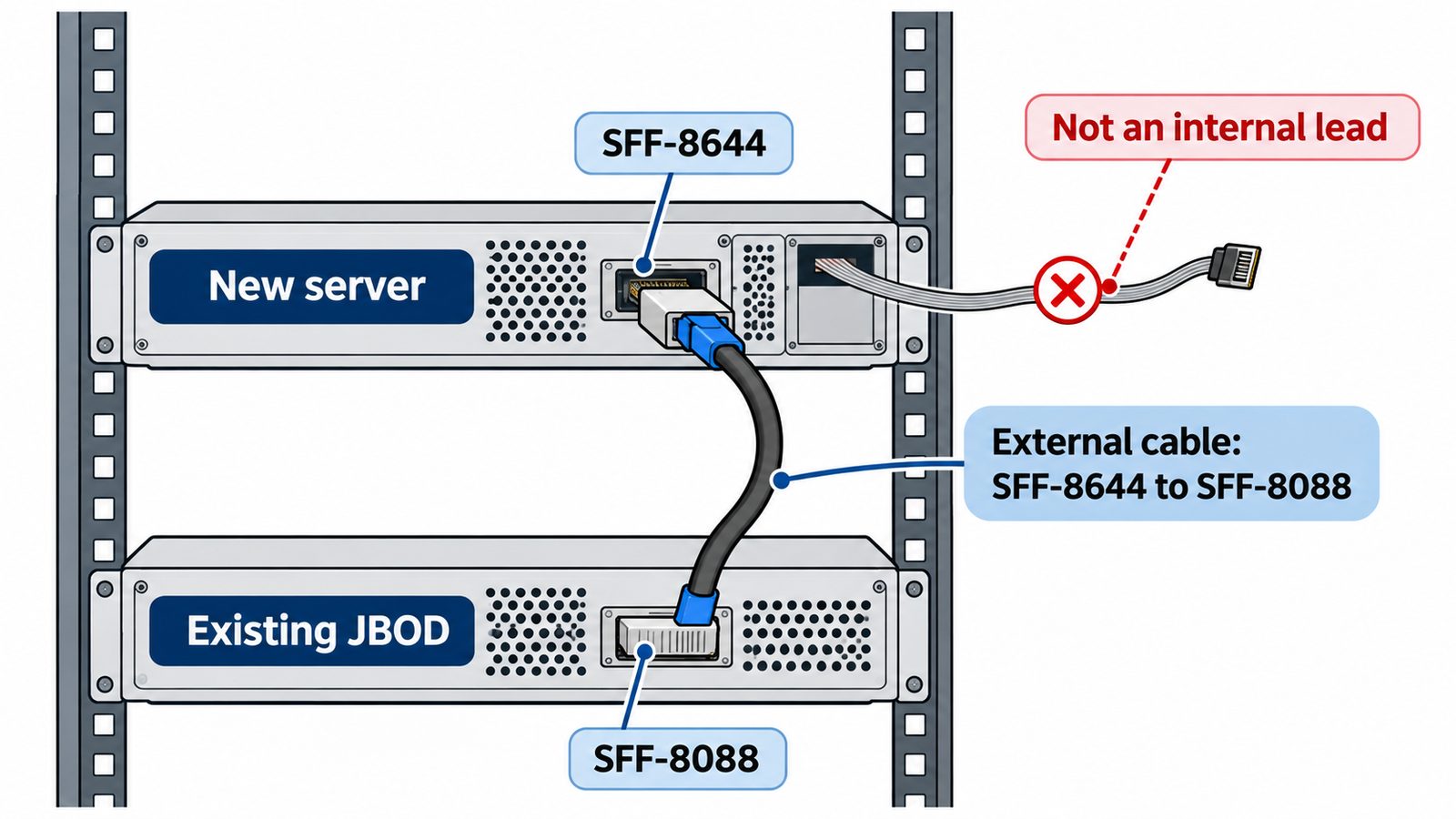
Upgrades often replace the head server and keep the storage shelf. Older JBOD enclosures use external SFF-8088 ports, and newer HBAs use external SFF-8644. Neither plugs into the other, so the external cable needs SFF-8644 on the server end and SFF-8088 on the shelf end.
Do not bridge that gap with internal cables. SFF-8087 and SFF-8643 are internal parts; the SFF-8643 page lists a plastic housing for links inside the chassis. External cables use metal shells and pull tabs. Lianbang's SFF-8644 page lists 12 Gbps, passive reach up to 7 m, and 26–30 AWG. The SFF-8088 page lists a passive build in 28–30 AWG and publishes no rate. Measure the run port to port, including the drop down the rack; the final length is confirmed on the order. If the controller header sits inside the server and the link exits through a bracket, write that down as an internal-to-external transition.
Decision 6: Choose a straight catalog cable or a transition cable built to your drawing.
Some links in an upgrade have the same connector at both ends, and Lianbang's catalog lists those: SFF-8087 to SFF-8087, straight SFF-8088, straight Mini SAS HD SFF-8644, and SlimSAS SFF-8654 with straight connectors. The SFF-8643 and SFF-8482 pages show breakout forms. The SFF-8482 photo, for example, shows the drive connector split into a SATA data lead and a 4-pin power lead.
Lianbang quotes links with a different connector at each end per drawing, for example SFF-8643 to SFF-8087, SlimSAS to SFF-8643, or SFF-8644 to SFF-8088. Send the pinout or the two part numbers you are replacing, plus the backplane's sideband or management requirements. If your plant terminates its own assemblies, Lianbang sells the bulk wire by length: SAS ribbon cable in 6-pair and 12-pair flat builds for SAS links, and PCIe twinax cable for 85 Ω PCIe links.
Five mistakes that stall a data center upgrade
- Ordering by one end only, for example "Mini SAS HD cable" for a link whose other end is an SFF-8087 backplane.
- Expecting a connector change to change the protocol, such as cabling a SAS controller to an NVMe backplane through an SFF-8643 to SlimSAS cable.
- Writing "Mini SAS HD" without the SFF number, so an internal SFF-8643 arrives for an external SFF-8644 port, or the other way round.
- Getting the breakout direction wrong, so a forward breakout arrives for a link that needs a reverse one.
- Bridging a new server and an old JBOD with internal cable through an open slot, instead of an SFF-8644 to SFF-8088 external cable.
What to send for a quote
Paste these lines into the request, one block per link:
- End A and End B: connector at each end (SFF-8087, SFF-8643, SlimSAS SFF-8654, MCIO, SFF-8482, SFF-8088, or SFF-8644), and whether each end is inside the chassis or on the rear panel
- Protocol: SAS or PCIe, and the impedance (100 Ω for SAS, 85 Ω for PCIe)
- Rate: the slower end's rate, and whether the cable should be built for the faster end
- Lanes: channel count at each end, breakout or straight, number of legs, and forward or reverse direction
- Length: overall length and leg lengths, measured port to port
- Supply form: finished assembly per drawing, or bulk wire by length
- Drawing, pinout, or the part numbers being replaced, plus quantity per server and total servers in the upgrade
Lianbang builds straight catalog assemblies and transition cables to order. Any rate, length, or gauge beyond what each page lists is confirmed on the order. For the rack-wide view of where each cable family sits, see our guide on types of cables used in a data center rack. The data center & networking page shows every product on one page; send your link list with the request.