







A SAS drive cable fails at quote time when the line names only the drive plug. The controller still has its own header. The drive still needs power. One header can feed more than one drive, and a one-to-four request is a channel count, which this page does not print as a catalog shape. If you are the engineer or buyer writing that line, work through the six decisions below in the order you make them, check the five mistakes that send the wrong build, and paste the checklist at the end into your request.
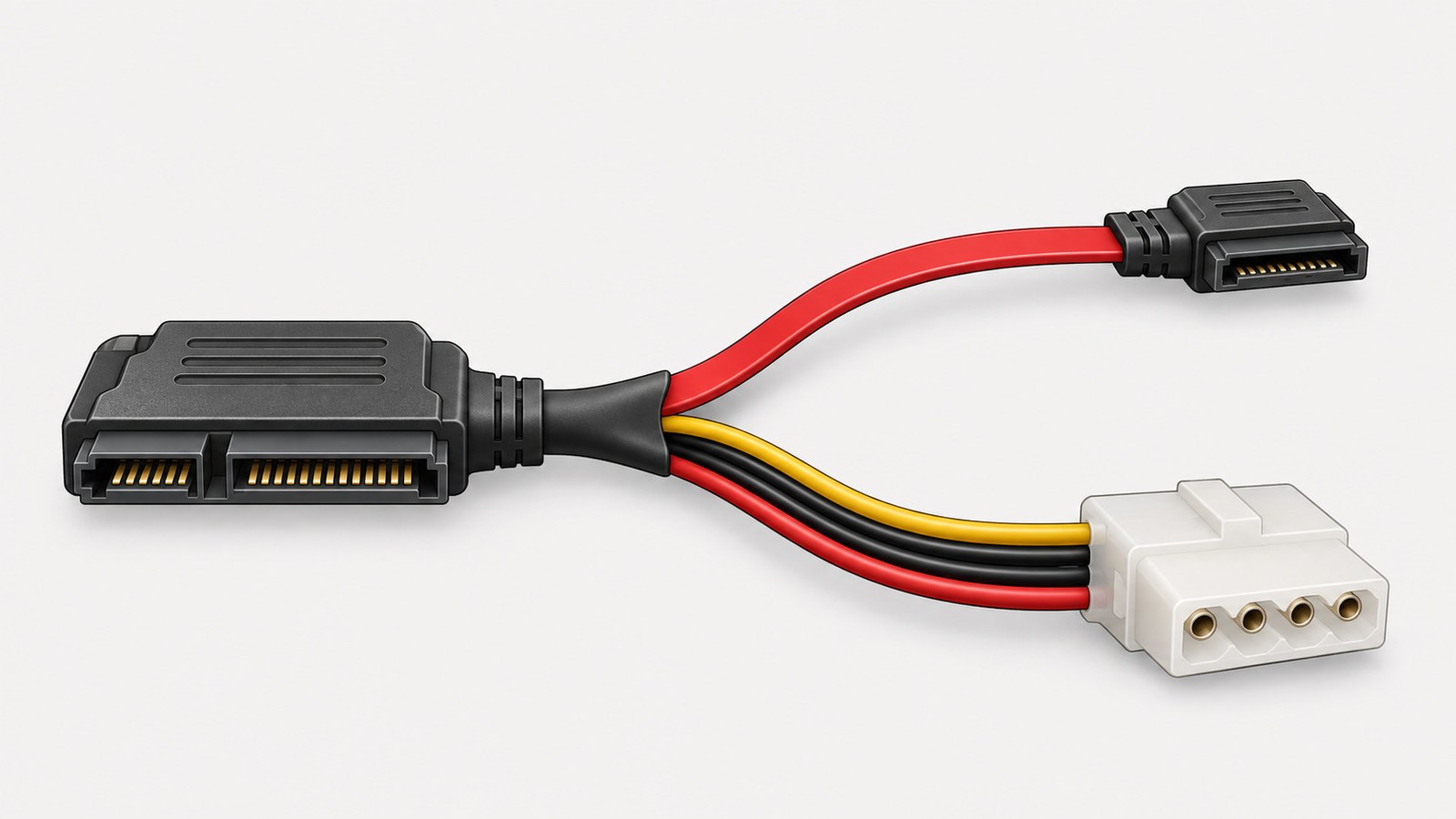
Lianbang's SFF-8482 cable is the drive-end page in this guide. It lists an SFF-8482 for a SAS hard drive or a SAS SSD, two SAS channels to one drive, inside the chassis, on a multi-drive backplane or a single-drive adapter.
SAS cable types, and where this one sits
SAS cable types split into the drive end, the controller or backplane end, and the bulk wire a plant cuts to length. SAS connector types follow the same split. An SFF-8482 is the drive end. A controller header is a different connector, and Lianbang lists those on their own pages.
What is a SAS backplane, in the practical sense: a board in front of several drives that presents one multi-lane header to the controller. When that board is already in the chassis, the cable matches the header on the board. The SFF-8482 page is the other case. The drive connector is on the cable, two SAS channels to one drive.
SAS cable vs SATA cable
Lianbang's SFF-8482 photo shows the drive connector broken out to a SATA data lead and a 4-pin power lead. The spec table still names a SAS hard drive or a SAS SSD. A SAS cable vs SATA cable check starts with that pair of facts. The lead on the photo is a shape. The drive on the table is the protocol. Write both. A SATA-shaped data lead on the drawing does not change the drive line to SATA.
Decision 1: Name one SAS drive before you name a backplane.
The page gives two installs: a multi-drive backplane, or a single-drive adapter. Both still describe two SAS channels to one drive. Count drives first. One SFF-8482 line is one drive.
If the chassis already has a backplane header and the drives plug into the board, the cable you need leaves from that header. An SFF-8482 does not have to appear on that drawing. Say which of the two installs you have, in one sentence, at the top of the line.
Decision 2: Write where the drive gets power.
The published photo is an SFF-8482 broken out to a SATA data lead and a 4-pin power lead. Power on that build travels on the 4-pin lead. If your chassis feeds the drive from a separate power harness, say so, and say whether this cable still carries the 4-pin lead.
The page does not list a pinout beyond that photo description. The power path on your drawing is confirmed on the order.
Decision 3: Put the controller connector on its own line.
The SFF-8482 page does not name the controller end. That end is a separate catalog choice, and it changes the build.
Lianbang's SFF-8087 page lists an internal Mini-SAS 4i with SFF-8087 at both ends, for an array card: up to 4 channels at 6 Gbps per channel, RoHS 2.0. The same page says both 6 Gb/s Mini-SAS 2.0 and SAS 3.0. Both lines stay. The photo on that page is a straight cable.
Lianbang's SFF-8643 page lists an internal HD MiniSAS cable in a plastic housing, 12 Gbps per channel, 36-pin and 72-pin, SAS 3.0 Revision 5a, RoHS 2.0, for a server or a storage backplane. The photo on that page is a breakout, one high-density connector split into two smaller connectors.
Copy the connector, the pin count, and the page you are matching onto the controller line. A straight SFF-8087-to-SFF-8087 cable and an SFF-8643 breakout are different quotes from the drive-end page.
Decision 4: Say breakout or straight. Read the photo, not only the flyer name.
The SFF-8482 flyer name is male-to-female. The photo is a breakout to a SATA data lead and a 4-pin power lead. The page states that this is not an extension with SFF-8482 at both ends.
Write the shape in words: drive end, far end, and whether the cable splits. "Male to female" alone can be read as the same plug at both ends. The catalog photo is the split build. If you need SFF-8482 at both ends, that shape is confirmed on the order, against a drawing.

Decision 5: Count drives against channels before you ask for a fanout.
One SFF-8482 is two SAS channels to one drive. An SFF-8087 line lists up to 4 channels, on a straight cable with that connector at both ends. An SFF-8643 photo shows one connector split into two, and the page lists 36-pin and 72-pin bodies.
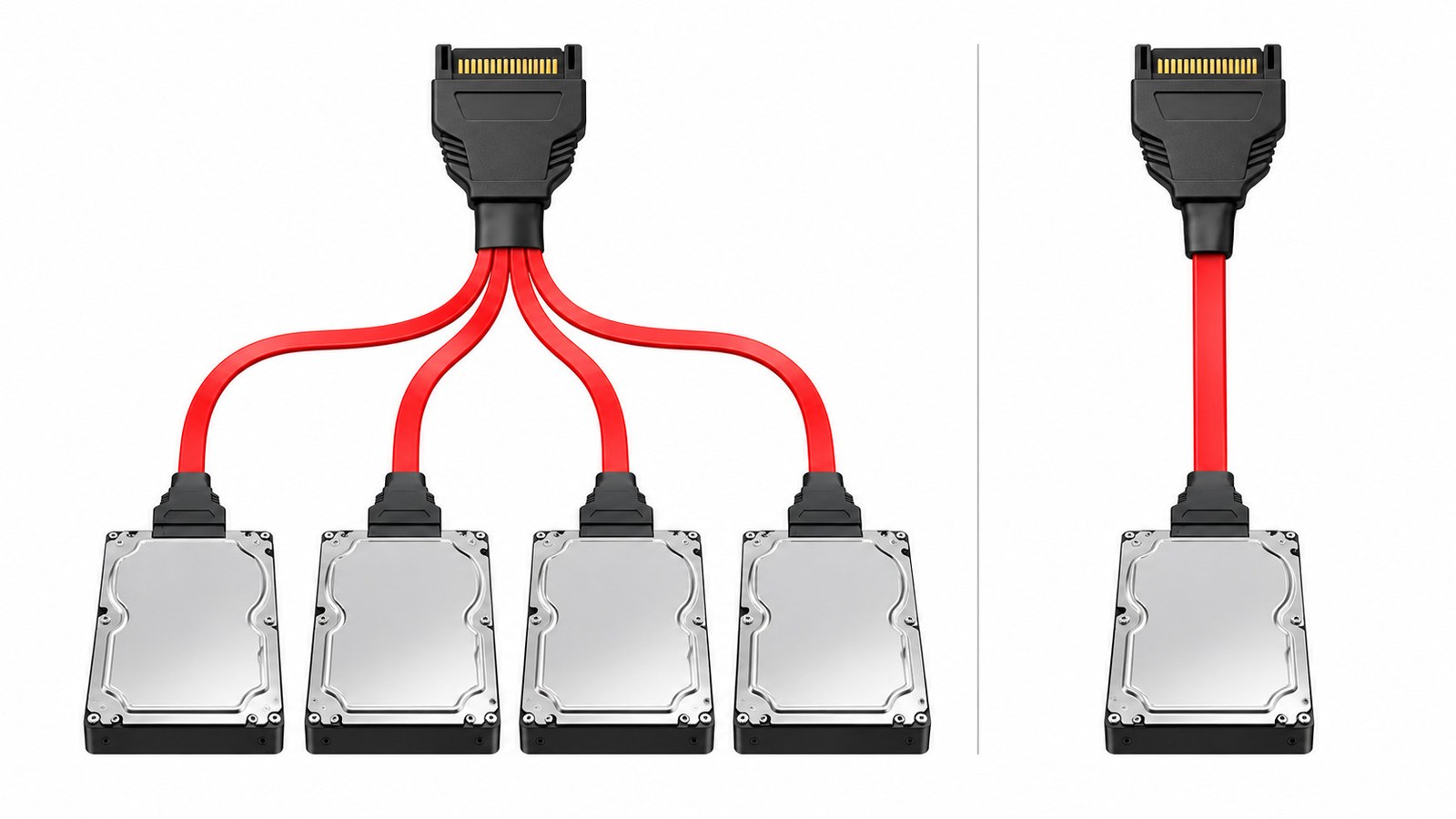
A one-to-four fanout is four drive legs from one controller header. That leg count is not the SFF-8482 photo, and it is not the one-to-two photo on the SFF-8643 page. Add the drives, write the channel count at the controller, and write the number of legs. A fanout built to a drawing has its leg count confirmed on the order.
SAS expander vs HBA matters on this line only as a label for the controller end. An expander and an HBA can both present a multi-lane header. The cable still follows the header on the board you are plugging into, and the drive count at the far end.
Decision 6: Copy the rate from the page that publishes it.
The SFF-8482 page does not list a data rate, a length, or a wire gauge. None of those three goes on the drive-end line unless you are confirming them on the order.
The controller pages do publish rates, and they stay on those lines. SFF-8087 lists 6 Gbps per channel, and also names Mini-SAS 2.0 and SAS 3.0. SFF-8643 lists 12 Gbps per channel. A link between a faster controller page and this drive-end page needs the rate written on the quote. The drive-end page itself still has no published rate.
Five mistakes that send the wrong drive cable
- Ordering "SFF-8482, male to female" and expecting SFF-8482 at both ends. The catalog photo is a data lead plus a 4-pin power lead.
- Leaving power off the line. The published build carries a 4-pin power lead, and a chassis with its own power harness needs that called out.
- Naming only the drive plug. The controller end is an SFF-8087 straight cable or an SFF-8643 breakout, and each is its own page.
- Asking for a one-to-four fanout on the SFF-8482 page. That page is one drive. A fanout needs a leg count on the order.
- Copying 6 Gbps or 12 Gbps from a controller page onto the SFF-8482 line. The drive-end page publishes no rate.
What to send for a quote
- One SAS hard drive or SAS SSD, and the install: single-drive adapter or multi-drive backplane.
- Power path: 4-pin lead on this cable, or power from another harness.
- Drive-end connector: SFF-8482.
- Shape: breakout to a data lead and a 4-pin power lead, or a straight build confirmed on a drawing.
- Controller-end connector, pin count, and whether that end is the straight SFF-8087 catalog cable or the SFF-8643 breakout.
- Channel count at the controller, number of drives, and number of legs if the cable fans out.
- Rate, length, and wire gauge: blank on the SFF-8482 page, so each one you need is confirmed on the order.
- A drawing, or the two part numbers you are replacing.
Send that list through the quote button on Lianbang's SFF-8482 cable page. A controller-end build that matches a different catalog photo is a separate line on the same request.