







When a build sheet for a new rack goes out, it often puts every high-speed cable on one tab: MCIO jumpers for the GPU tray, Mini SAS HD leads for the drive bays, an external cable to a storage expansion shelf, and 400G or 800G links up to the top-of-rack switch. Quotes come back mismatched when those runs are treated as interchangeable, or when an internal connector is ordered for a port that crosses between chassis. This guide is for the hardware engineer or buyer putting that bill of materials together. It walks through six decisions, grouped by where each cable sits in the rack, and ends with a request checklist you can copy into an RFQ.
The assemblies and bulk wires in this guide come from Lianbang's data center cable range: PCIe, MCIO, GenZ, Mini SAS HD, SlimSAS SFF-8654, MiniSAS SFF-8643, MiniSAS SFF-8088, SAS SFF-8087 to SFF-8087, and SAS SFF-8482 M-to-F assemblies, along with 800G QSFP-DD ACC, 400G QSFP-DD AOC, and 100G QSFP28 AOC links, plus the bulk high-speed cable inside them.
Data center cable types by where they sit in the rack
Most questions about data center cable types and the types of cables used in a data center become simpler once you split the rack into three physical zones: inside the server chassis, out the rear panel to an external storage shelf, and up the rack to the switch. Each zone uses its own connector families and bulk wire builds.
| Rack zone | What the link connects | Catalog assemblies used | Bulk wire behind the link |
|---|---|---|---|
| 1. Inside the server: compute & NVMe | Motherboard, riser, GPU board, NVMe backplane | PCIe Cable, MCIO Connection Cable, SlimSAS SFF-8654 Cable, GenZ Connection Cable | PCIe twinax cable (85 Ω) |
| 2. Inside the server: storage backplane | HBA or RAID card to SAS/SATA backplane or drives | Mini SAS HD Cable, MiniSAS SFF-8643 Cable, SAS SFF-8087 to SFF-8087, Mini SAS Cable Assembly, SAS SFF-8482 M-to-F | SAS ribbon cable (100 Ω, 6-pair or 12-pair) |
| 3. Rear panel to external storage | Server external HBA port to a SAS JBOD enclosure | MiniSAS SFF-8088 Cable | Controlled-impedance SAS cable (confirmed on the order) |
| 4. Server to top-of-rack switch | Network card (NIC) to ToR switch ports | 800G QSFP-DD ACC, 400G QSFP-DD AOC, 100G QSFP28 AOC | QSFP high-speed differential cable (8-pair, 56 Gbps per lane, inside QSFP28/56 modules) |

Decision 1: Split the bill of materials by rack zone before naming connectors.
A connector family that works on a motherboard will not survive hanging off the back of a rack. Internal connectors such as MCIO, SlimSAS SFF-8654, MiniSAS SFF-8643, and SFF-8087 have compact latches meant for a closed chassis. External links between boxes need shielded metal shells and pull latches, such as SFF-8088 on a storage shelf or QSFP28 and QSFP-DD cages on a switch panel.
Group your RFQ lines into internal server links, external chassis-to-chassis storage links, and switch links first. That single step stops an internal SFF-8087 or SFF-8643 assembly from being ordered for a rear-panel port.
Decision 2: Match in-chassis compute and storage links by protocol and impedance.
Inside the server, compute links and storage links look similar on a drawing, but they do not run on the same wire. PCIe 5.0 (32 GT/s NRZ, 128 GB/s bidirectional on x16) and PCIe 6.0 (64 GT/s PAM4, 256 GB/s bidirectional on x16) run at 85 Ω on MCIO, SlimSAS (for PCIe 4.0 at 16 GT/s and PCIe 5.0), CopprLink, or PCIe and GenZ assemblies. SAS links run at 24 Gbps and 100 Ω on Mini SAS HD (SFF-8643) or SlimSAS (SFF-8654).
Because SlimSAS SFF-8654 can carry either protocol, write both the connector and the protocol on the line item: 85 Ω when it links NVMe drives or a PCIe riser, and 100 Ω when it links a SAS controller to a SAS backplane. For a closer look at internal pinouts and lane counts, see our earlier guide on server internal cable types.
Decision 3: Choose flat cable vs round cable around the server airflow path.
Inside a 1U or 2U tray, flat cable vs round cable is a routing and cooling decision. Where the cable has to lie flat against the chassis floor, slip under a riser, or fold cleanly at a SAS backplane connector behind the fan wall, a flat ribbon lay keeps the profile low and bends in one plane without blocking airflow. Where the path twists through bulkheads or bundles along a side wall, a round twinax bundle turns more easily.
For storage backplanes, Lianbang's SAS ribbon cable is built in 6-pair and 12-pair flat configurations, with overall length, segment lengths, and exit direction made to order. Where a cable plugs straight onto an individual drive rather than a backplane header, the catalog also includes SAS SFF-8482 M-to-F assemblies.

Decision 4: Switch from SFF-8087 or SFF-8643 to SFF-8088 when leaving the chassis for a SAS JBOD enclosure.
Storage expansion often pairs a head server with a SAS JBOD enclosure in the same rack or the next rack over. Inside the box, older SAS backplanes use SFF-8087 and newer ones use Mini SAS HD SFF-8643. Once the link crosses the rear bezel into open rack space, an internal unshielded latch is the wrong interface.
For external SAS ports, specify MiniSAS SFF-8088 Cable assemblies, or an internal-to-external transition if the HBA header sits inside the server and exits through a bracket. Write both ends on the quote, and note whether each end mates inside the chassis or on the rear panel.
Decision 5: Separate active copper from active optical on the switch uplink.
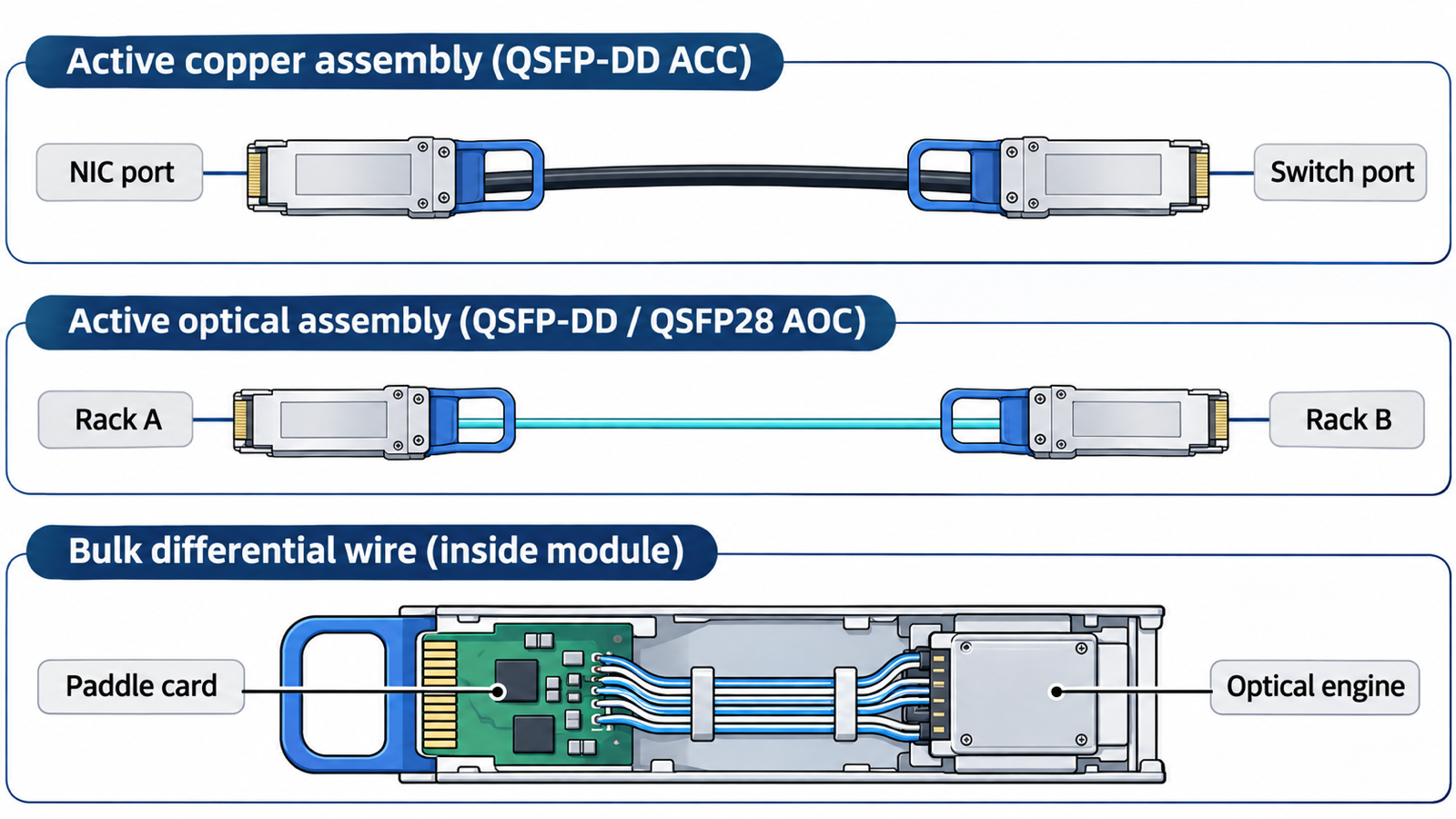
Moving data from the server NIC up to the top-of-rack switch, or between switches, brings in active vs passive cable and copper vs optical choices. At 100G, 400G, and 800G, the catalog covers three distinct switch links under its available interconnects:
- 800G QSFP-DD ACC (Active Copper Cable) for high-density 800G copper runs where active signal conditioning extends copper reach within the rack or to an adjacent rack.
- 400G QSFP-DD AOC (Active Optical Cable) and 100G QSFP28 AOC for runs where optical fiber is preferred for reach, weight, or crowded cable trays.
If your team builds optical transceivers or switch components rather than buying finished switch cords, the short internal run from the paddle card to the optical engine uses a different product altogether: eight-pair QSFP high-speed differential cable rated at 56 Gbps per lane for QSFP28 and QSFP56 modules.
Decision 6: Decide whether your line needs finished assemblies or bulk high-speed wire.
Server integrators and data center hardware teams usually order finished assemblies built to their drawing, tested and ready to plug in. Cable assembly houses, module makers, and EMS plants with their own termination lines often buy the bulk wire by length and terminate it in house.
Lianbang supplies both from the same production chain. Finished assemblies—PCIe, MCIO, GenZ, Mini SAS HD, SlimSAS SFF-8654, SFF-8643, SFF-8088, SFF-8087 to SFF-8087, SAS SFF-8482 M-to-F, and the QSFP-DD / QSFP28 links—are quoted per drawing. Bulk wire is sold by length across three pages:
- PCIe twinax cable for in-chassis GPU, NVMe, and accelerator links
- SAS ribbon cable in 6-pair and 12-pair flat builds for storage backplanes
- QSFP differential cable in an 8-pair, 56 Gbps-per-lane round build for QSFP28 and QSFP56 modules
All three bulk cable families share a -40 to +85°C operating range and RoHS and REACH compliance. Lianbang runs bare wire and copper drawing, cable forming, connector hardware stamping, injection molding, and final assembly across six production bases in China and Vietnam, including its Ho Chi Minh City facility.
Five mistakes that stall a data center rack build
- Putting internal SFF-8087 or SFF-8643 connectors on a line item that actually runs outside the chassis to a SAS JBOD enclosure instead of specifying SFF-8088.
- Ordering SlimSAS SFF-8654 by connector name alone without stating PCIe (85 Ω) or SAS (100 Ω).
- Routing thick round bundles across a 1U fan wall where a flat 6-pair or 12-pair SAS ribbon cable is needed to clear the lid.
- Confusing an external 100G/400G/800G switch assembly (QSFP28 AOC, QSFP-DD AOC, or QSFP-DD ACC) with the 8-pair bulk differential wire used inside a QSFP28 or QSFP56 module.
- Sending a connector name without a drawing for a custom breakout, or asking for a catalog assembly when your plant actually needs bulk wire on spools.
What to send for a quote
Copy the lines that match your rack into the request:
- Rack zone: inside the server (compute or storage), external server-to-JBOD, or server-to-switch uplink
- Supply form: finished cable assembly (quoted per drawing) or bulk wire by length
- Protocol and target rate: PCIe 4.0 (16 GT/s), PCIe 5.0 (32 GT/s), PCIe 6.0 (64 GT/s PAM4), SAS (24 Gbps), or 100G / 400G / 800G switch link
- Impedance: 85 Ω for PCIe, 100 Ω for SAS, or confirmed on the order for custom builds
- End A and End B: connector family (MCIO, SlimSAS SFF-8654, Mini SAS HD SFF-8643, SFF-8088, SFF-8087, SFF-8482 M-to-F, GenZ, QSFP28, or QSFP-DD), lane count (4i, 8i, 6-pair, 12-pair, or 8-pair), and any breakout
- Physical routing: overall length, segment lengths if split, flat ribbon or round bundle, and exit direction
- Drawing, sample, or pinout table, plus target order quantity
To review the full lineup on one sheet, download the Lianbang high-speed cable catalog or visit the data center & networking page. Send your drawing or list above, and we will quote the assemblies or bulk wire to match your rack layout.