








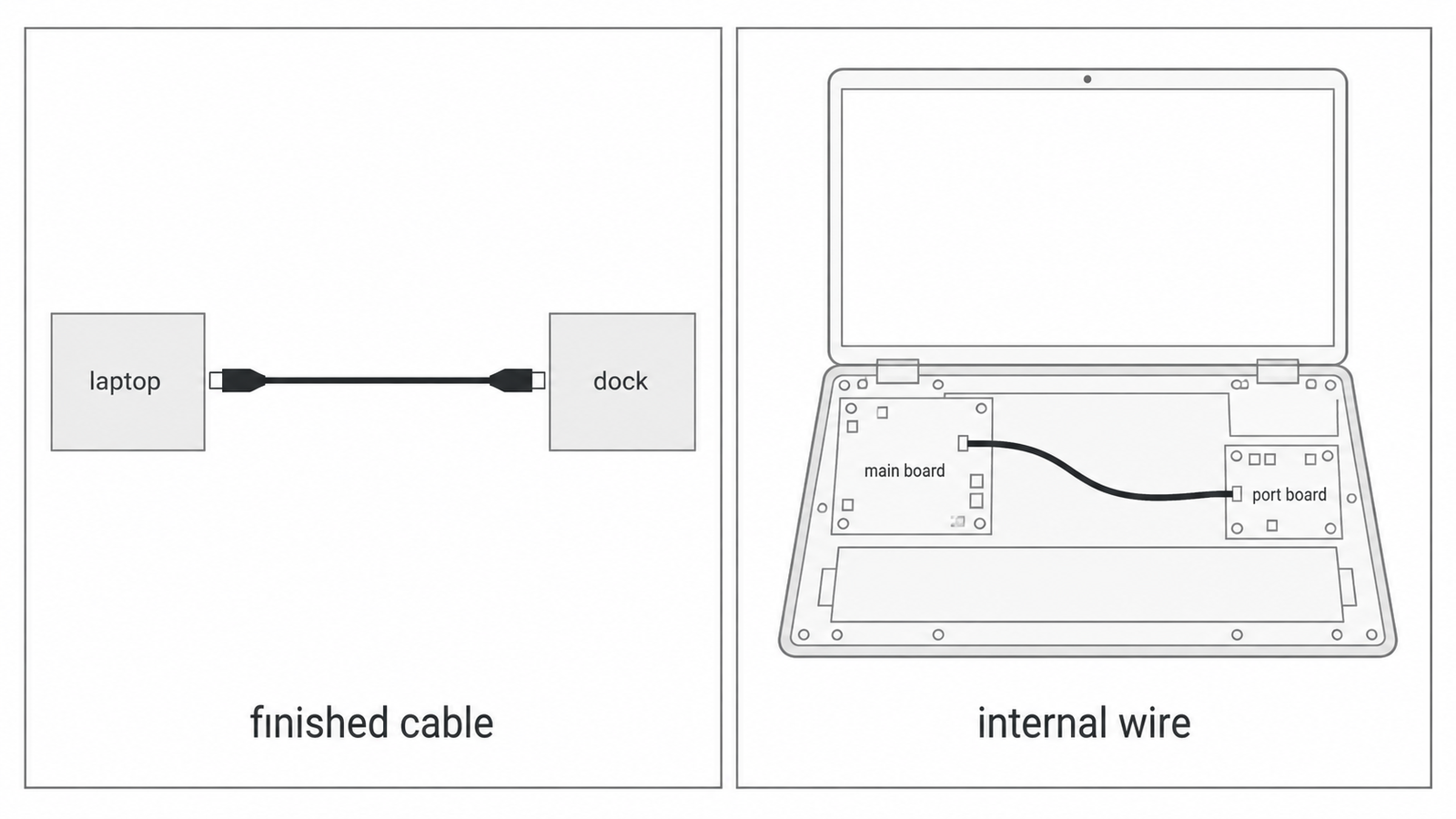
A laptop or a dock is already designed when the internal wire gets ordered. The port board is placed, the battery is placed, and someone still has to buy the short run between the main board and that port. Three suppliers can answer one line that only says "USB4" with three different products: a finished cable with a plug on each end, bulk micro coax for inside the chassis, and a retail listing that also sells charging. This guide is for the buyer writing the internal-wire order. It walks through six decisions in the order they should be made, and ends with a list you can paste into the request.
What is a micro coaxial cable? It is a very small round coax: an inner conductor, insulation, and an outer shield, thin enough to turn inside a laptop. The shorter question, what is micro coax, names that same wire. What is usb4 cable, on a shopping page, is usually the finished cable that runs between two products on a desk. The run inside the chassis is a separate order.
The product behind it is Lianbang's USB4 micro coaxial cable, black round multi-core micro coax, supplied by the meter for the device builder to terminate. It is rated 40 Gbps and compatible with USB4, Thunderbolt 4, and USB 3.2, at -20 to +80°C. The rules apply to any internal micro coax on that kind of link.
Decision 1: Name the product. A finished cable and the wire inside the chassis are two orders.
A request that says only "USB4" gets whichever product that supplier sells under the word. usb4 cable vs usb c is the first split to write down. USB-C is the shape of the plug. The difference between usb c and thunderbolt 4 is a protocol difference on that same plug shape: Thunderbolt 4 is one link the chassis may train, and the plug outline does not tell you which wire is inside.
Write the order as internal wire, from the main board to the port board or the module board, in a laptop, dock, or high-speed peripheral. If the quote you need has a plug on each end, that harness is a separate quote. This page is the bulk cable.
Decision 2: Protocol. Name USB4, Thunderbolt 4, or USB 3.2, and keep the rate at 40 Gbps.
usb4 vs thunderbolt 4 cable looks like a choice between two constructions. On this build it is one wire. USB4, Thunderbolt 4, and USB 3.2 are the protocols the same series is compatible with. usb4 or thunderbolt 4 cable, on the request, means you write which link the chassis will actually carry, so every supplier prices that link.
The usb4 cable specification you can fill from this card is the rate, the protocols, and the temperature. usb4 cable 40gbps data transfer is that rate: 40 Gbps. Gauge, impedance, and shield construction are confirmed on the order. Leave charging wattage off the wire request. A faster retail listing is a different product.
Decision 3: Length. Keep the external length limit off the internal cut.
usb4 cable length, usb4 cable length limit, and usb4 cable max length are questions about the finished cable between two products. usb 3.2 max cable length is the same question at the lower rate this wire also carries. A passive cable with plugs has to close the loss budget across that outside run, so those cables are sold in fixed lengths. None of those lengths is the number to copy onto an internal order, and this card does not publish a meter figure.
Measure the path the wire will take inside the chassis: off the main board, past the battery or the fan, through the tie points, onto the port board. Add a little slack so the assembler is not pulling the coax over a sheet-metal edge. That cut length is what Lianbang supplies by the meter.
Decision 4: Construction. Discrete cores or a bundle, and micro coax rather than the other coax types.
How many types of coaxial cable is a wide catalog. The wire in this chassis is micro coax. What internet speed can coax handle is the coax that feeds a building; that drop cable is a different order, and it does not belong on a laptop wire request.
Micro coax cable types, on this order, are discrete cores or a bundle. Say which one the layout uses. How does shielded coax work on this build: the inner conductor carries the signal, and the outer conductor is the return and the shield, so the run can sit near a battery, a fan, or a power board. The card states an inner and an outer shield. It does not publish whether that outer shield is foil, braid, or both, so that construction is confirmed on the order.
Twinax vs micro coax is a structure difference. Twinax is a differential pair and lives on another product. Micro coax vs twinax, for the USB4 run inside the chassis, is this wire: one coax per signal path, where a multi-core differential bundle starts to struggle at 40 Gbps.

Decision 5: Gauge and bend. Leave the AWG blank until the route is known.
38 awg micro coax cable appears in search because that gauge shows up in other catalogs. It is not a published gauge for this cable. Common coax cable sizes will not give you the outer diameter either. Micro coax bend radius is confirmed on the order, against the tightest turn you measured in Decision 3.
Wire gauge, core count, and outer diameter are confirmed on the order, together with the length, because a finer wire turns more easily and a heavier wire carries the rate farther. Impedance is confirmed on the order against the board's target. The build is made so the cable can turn inside a thin chassis without that impedance drifting. Do not fill an ohm value the card does not list.
Decision 6: Pinout and color. Those lines belong on the connector drawing.
Usb 4 wire pinout is the connector. The bulk wire does not ship with a pin map. Usb 4 wire color code is how a finished cable marks each conductor at the plug. Usb wiring explained, for this wire, stops at the jacket: black is the standard color, and other jacket colors are made to order so an assembler can tell runs apart. Inner conductor, outer conductor, and insulation are made to order. Termination is the device builder's work. A harness with connectors is a separate quote.
Five mistakes that put the wrong wire in the chassis
- Sending a request that only says USB4, then comparing a finished cable with plugs to bulk micro coax.
- Copying an external cable's length limit onto the run inside the chassis.
- Adding a charging wattage, or a faster retail rate, to a wire whose published rate is 40 Gbps.
- Filling the gauge from a catalog line found in search, including 38 AWG, before the route length is known.
- Ordering the wrong product. This series is bulk micro coaxial cable, black round jacket, for the builder to terminate, rated -20 to +80°C, compatible with USB4, Thunderbolt 4, and USB 3.2. A harness with connectors is a separate quote.
What to send for a quote
Paste this into the request.
- The product: laptop, dock, or peripheral, and that the run is inside the chassis
- Protocol the link will carry: USB4, Thunderbolt 4, or USB 3.2
- Routed length inside the chassis, with the slack, and a drawing or photo if you have one
- Discrete cores or a bundle
- Core count, if the board team has already counted paths
- The tightest bend on that route
- Jacket color, if more than one run shares the chassis
- Whether a connector harness is a separate quote
- A target impedance, if the board team has one
Length, inner and outer conductors, insulation, and jacket color are made to order on the USB4 micro coaxial cable. Impedance, wire gauge, core count, outer diameter, shield construction, and bend radius are confirmed on the order. Send the list above and the quote comes back against the path inside your chassis.